Radiology EHR Integration Implementation Roadmap: From Planning to Go-Live
Radiology EHR integration is the difference between an imaging department that runs as one connected system and one held together by a decade of point solutions duct-taped in. Get it wrong, and radiologists lose their mornings hunting for missing orders instead of reading studies. That’s not hypothetical. It happens at hospitals that skip the planning step and start wiring interfaces together on the fly.
Demand for connected imaging workflows isn’t slowing down. Hospitals keep adding modalities and opening outpatient imaging centers. They sign value-based contracts that punish slow turnaround. None of it works without a plan. A structured radiology implementation roadmap sequences the work so the project doesn’t blow up mid-build, and radiology workflow integration lives or dies on that sequencing more than on how clever any single interface is.
Five phases make up that roadmap: an honest look at what’s running today on one end, and the unglamorous work of tuning a system after go-live on the other.
Why Radiology EHR Integration Requires a Structured Implementation Plan
Radiology integration projects involve greater architectural complexity than standard interface builds. The EHR, PACS, RIS, and every physical scanner require continuous data exchange, yet each relies on disparate proprietary protocols. DICOM dictates the core imaging standard, enabling a CT study generated by one vendor’s hardware to render correctly on another’s viewer. HL7 and FHIR carry everything else: the order, the context, the report. Radiology interoperability means traffic lands where it belongs, formatted the way the receiving system expects, without someone re-keying it by hand at midnight.
PACS EHR integration and RIS EHR integration get lumped together constantly. They’re not the same problem, though. PACS carries the image. RIS carries the schedule and the report. The EHR has to hold both before a clinician trusts the chart. Miss the order and a radiologist can’t read the study. Miss the chart update and a referring physician never sees the result.
Then there’s data consistency, which sounds dull until it isn’t. A patient identifier off by one digit turns into hours of reconciliation weeks later. Radiology EHR implementation protects continuity of care through cutover, because imaging volume doesn’t pause for a go-live weekend. Connecting the systems is the easy part. Sequencing that connection around a department still reading studies every day is the real job, which is why PACS, RIS and EHR integration works better as one program, not three.
Five Phases of a Successful Radiology EHR Integration Project
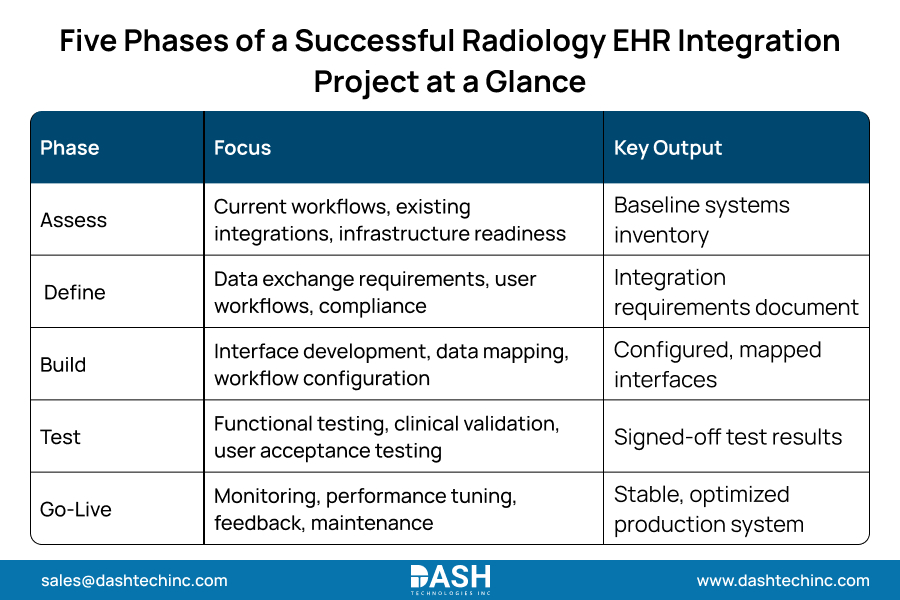
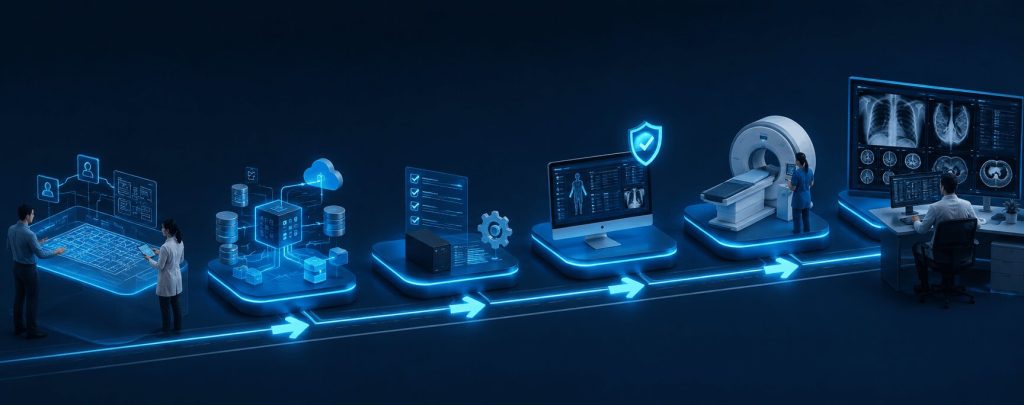
A radiology EHR integration implementation project breaks into five phases. Treat each one as a gate. Skip ahead and testing time shrinks, along with the odds of a clean go-live.
Phase 1: Assess Existing Systems
Walk the floor before writing a single interface. Document current workflows, catalog every integration point already in place, and check infrastructure readiness. Leadership needs one accurate picture: which PACS and RIS versions are actually in production, and where data still moves by CD instead of automatically.
Phase 2: Define Integration Requirements
Turn the assessment into a list. Which HL7 message types, FHIR API development resources, and DICOM services the project needs. User workflows drive most of that list. Compliance narrows it further, including HIPAA and the data classes ONC defines under its USCDI standard. This step turns a generic EHR integration roadmap into one built for radiology.
Phase 3: Build and Configure Integrations
Interface development and data mapping happen here, alongside workflow configuration inside the EHR, PACS, and RIS. This is where imaging workflow integration holds up or falls apart under real reading volume. Teams document every field mapping as they go; an undocumented mapping breaks first.
Phase 4: Test and Validate
Functional testing confirms the interfaces move data correctly. Clinical workflow validation goes further, checking results against IHE Radiology integration profiles where applicable. User acceptance testing closes the loop. It puts the workflow in front of the people who run it daily, before go-live.
Phase 5: Go-Live and Continuous Optimization
Go-live isn’t the finish line. It’s the start of the part nobody budgets enough time for. Monitoring catches integration failures before they turn into patient safety events. Performance tuning fixes bottlenecks pre-launch testing missed, and user feedback points to what needs fixing next. Ongoing maintenance keeps the radiology integration roadmap current as systems upgrade.
Planning a Radiology EHR Integration Project?
Whether you're connecting an EHR with PACS, RIS, or multiple imaging systems, our interoperability experts can help you build and execute a scalable integration roadmap tailored to your radiology workflow.
Talk to Our Radiology Integration ExpertsCommon Challenges During Radiology Integration Projects
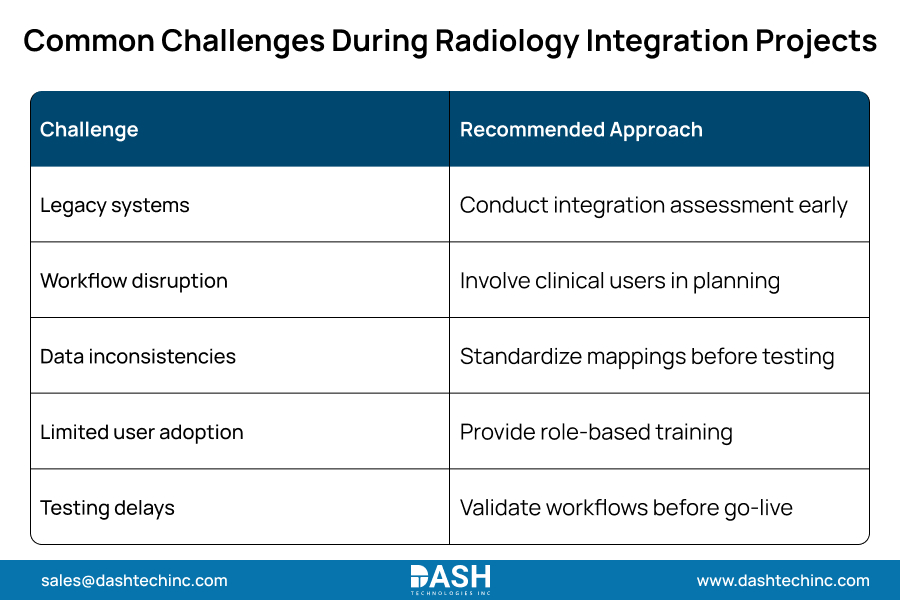
Radiology integration challenges rarely start with the interface engine. They start with what’s already in the building: legacy systems running versions the vendor stopped supporting, workflow disruption nobody warned the night shift about, data mapping that looked fine on paper, and staff who never asked for a new tool bolted onto their day.
Legacy systems create most of the drag. An eight-year-old RIS platform wasn’t built for FHIR-based exchange, so teams bolt on translation layers instead of native connections. Radiology data integration fails quietly here: accession numbers and patient identifiers drift between systems until a chart doesn’t match a study. Limited user adoption undercuts the investment when training lags the rollout. Testing delays push problems into the live environment instead of a sandbox. Data quality carried over from a prior system derails EHR data migration work tied to a radiology integration.
Healthcare imaging integration teams that identify risks early save time and avoid surprises at go-live. This helps maintain clinician trust.
Best Practices for a Smooth Go-Live
Using strict Radiology EHR integration best practices lowers deployment risks. It also helps avoid system failures during the launch.
- Bring radiologists and IT teams in early:
Bypassing clinical feedback during early architectural decisions guarantees post-deployment rework, fundamentally escalating technical debt and overall project costs. - Put workflow testing ahead of feature testing:
A technically functional interface that disrupts established diagnostic routines fundamentally constitutes a failed integration project. - Validate imaging data accuracy before cutover:
Engineering must strictly audit patient identifiers and accession routing alongside study payloads across the PACS, RIS, and EHR infrastructure before activation. - Monitor integration performance after launch:
The initial thirty-day operating window exposes pipeline bottlenecks that synthetic test environments simply cannot replicate under actual clinical load. - Plan ongoing optimization from day one:
Imaging workflow optimization requires persistent iteration cycles. Project teams must embed these review cadences directly into the core deployment architecture.
How Dash Technologies Helps Healthcare Organizations Modernize Radiology Integration
Dash Technologies builds radiology EHR integration programs for hospitals and imaging centers, covering PACS integration, RIS integration, and HL7 and FHIR interoperability, delivered without shutting the department down to get there. Assess first. Map every field. Validate against real workflows. Monitor after go-live instead of walking away once the contract ends.
Health systems bring Dash in when an integration underperforms, and for long-term support once the build stabilizes. That combination separates a working interface from one that holds up under daily patient volume. See how Dash approaches Radiology EHR Integration, review Radiology EHR integration use cases, or explore Dash’s EHR integration services.
Conclusion
Radiology EHR integration works when hospitals plan it, phase it, and stay involved after launch. Not when they build an interface and walk away. Skip the sequencing, and the project stalls somewhere between testing and go-live. Get it right, and a radiology implementation roadmap cuts risk at every phase while getting clinicians faster access to the patient information they need. Go-live sticks instead of limping along for six months. Contact Dashtech to build a radiology EHR integration roadmap around the PACS, RIS, and EHR systems you already have.
Frequently Asked Questions
About Dash

Dash Technologies Inc.
We’re technology experts with a passion for bringing concepts to life. By leveraging a unique, consultative process and an agile development approach, we translate business challenges into technology solutions Get in touch.